No Version History Option – HELP
-
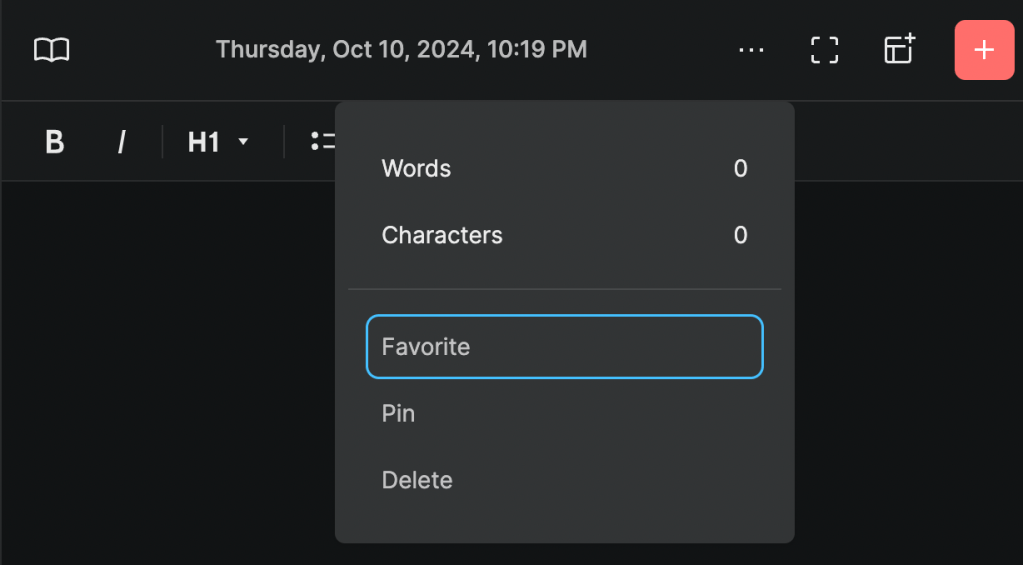
Hello, I am using my MacBook Air and version history is not listed. On my Android phone, there is a version history option when I click on the 3 dots, but on my MacBook, the only options listed are “Words, Characters, Favorite, Pin, Delete”. Version History is not an option. Can you please help troubleshoot this? Thank you!
-
Day One on Android doesn’t have version history yet AFAIK. The Mac should have it though. What is the version number of Day One on Mac?
-
I am unable to upload the screenshot so you an see that Version History is an option on my Google Pixel Phone (I thought that was android but it must not be.) On my MacBook Air, Version History is not an option. I’ve attached a photo of it below. The version on my computer is: 2024.21
Thank you for your help!
-
@nlarras7 Thanks. The screenshot attached looks like Day One on the web (dayone.me website). The Day One app on Mac should look like this: https://snipboard.io/MWxsRA.jpg
-
If we sign into out journal on a mac can we then still go to a previous histoery. I will go buy a mac tomorrow if that will help. I thought the option was available on the web. Is it not. Using Windows 11 should be perfect acceptable. Help
-
Hi there, @chalkhillfan! You can learn more about the current Version History options in this guide: https://dayoneapp.com/guides/troubleshooting/entry-version-history/
Version History is available in the iOS, Mac OS, and Android apps.
It is currently not available in the Web App and Windows App. We do have a feature request for this, however, and I’ve added your vote to the request.


 Day One Forums
