Distraction-Free Mode? aka Hide the Sidebar
-
Sometimes when you’re writing, it helps to just see an empty screen Nothing else.
In addition to Show/Hide Journals, a Show/Hide Sidebar would be greatly appreciated.
-
Hi @rossmorey
That’s a great request! That is not a feature that we currently offer, but I would be happy to forward your request to the team for consideration. While I am not able to provide detailed information on the point of time of any new release, I invite you to check the following for future feature announcements.
App Store Release Notes for Day One
https://itunes.apple.com/us/app/day-one-journal/id1044867788?mt=8 and https://itunes.apple.com/us/app/day-one/id1055511498?mt=12 pages
Join the Day One Facebook Community
https://facebook.com/groups/DayOneCommunity
Website
https://dayoneapp.com/ -
-
@brooklynisforlovers I’ve gone ahead and added your comment to the existing feature request. Thank you!
-
-
-
For the macOS version, I’ve asked Day One Support for this one for a long time. (The iPadOS version does offer the ability to hide the sidebar, but macOS still does not as of June 19, 2024.) I think it was at least a few years ago that I asked for this as well.
Timeline/Photos/Maps/Calendar… all of these should be able to be hidden via the menubar for a distraction-free writing experience. Ulysses has it, NotePlan has it, Day One on iPadOS has it. (Bear doesn’t, neither does Journey on macOS.)
How hard would it be to implement this feature? Add “Show Sidebar” or “Hide Sidebar” to the View menu in Day One, depending on whether it is currently shown or hidden. It would seem trivial to just hide those sidebar elements on the screen for a more distraction-free typing experience this way.
The only issue is that this would make the margins to the left and right of the journal text look even more pronounced. (Day One for macOS currently doesn’t offer a line width or number of characters per line option.) That’s another issue I’ve asked support about at least twice and put in a request for. With a little more flexibility and insight on the part of the designers and developers in this regard, we could have a better minimalistic journaling experience with this app.
-
Hi @jeffccw758. For macOS, there is an option to show the entry window only. Would that be helpful?
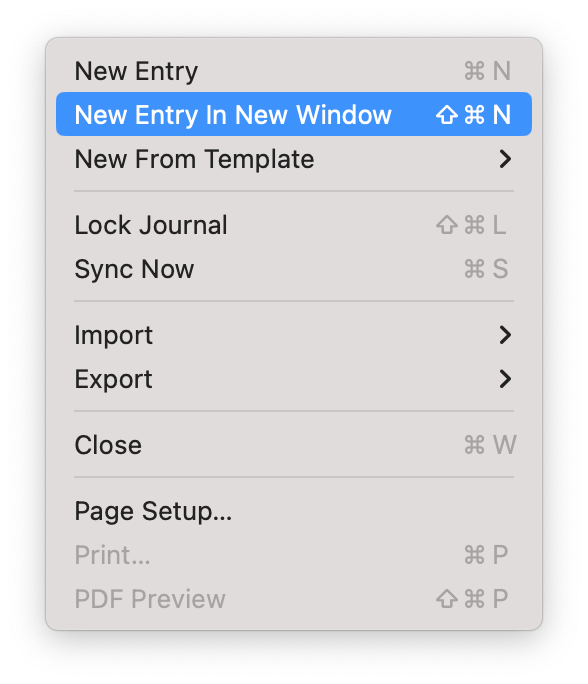
You can use File > New Entry in New Window and then minimize other windows.
Or click ••• at the top right of an entry > Open In > New Window.
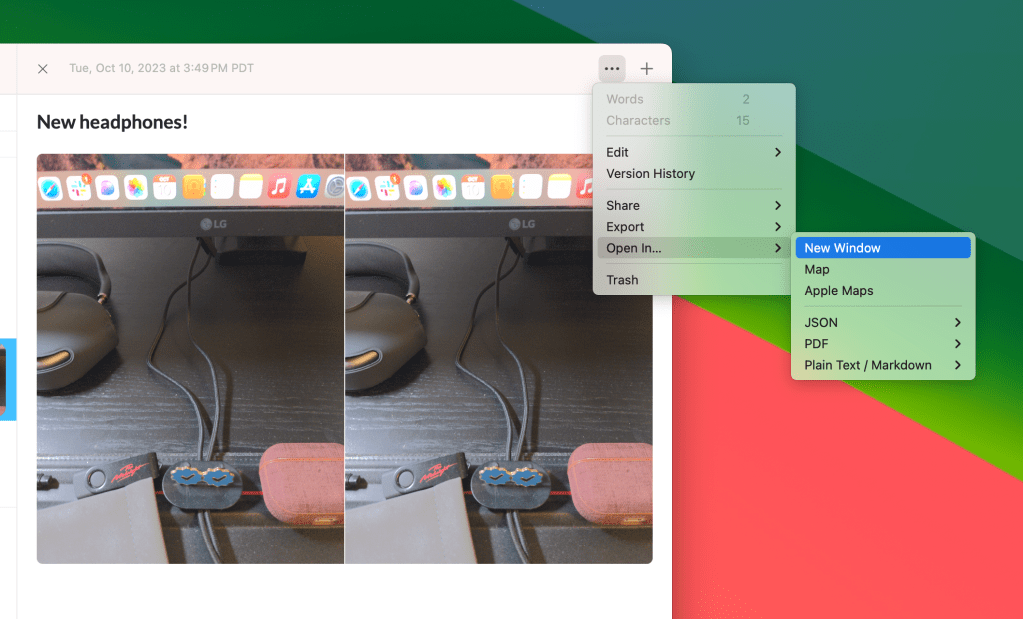
Will that work for you?
-
That does work for creating journal entries in macOS without seeing the sidebar (assuming the user remembers the shortcut). It doesn’t really solve the issue of wanting to hide the sidebar in the main window, though.
It would be preferable if the default was no sidebar. Other threads on this forum have talked about introducing a “focus mode”. It seems to be a popular user request, and one that I would welcome after so many years of being a Day One Premium user.
-
Hi @jeffccw758,
Thank you for sharing your feedback. I’ve gone ahead and added your comment to the existing feature request. -
Can you add this basic feature? People say <I asked for this a few years back> but still no improvement. Another 5 months has passed… It’s impossible to write when using small window.
-
The workaround that Day One staff suggested (opening a new blank window by using Command+Shift+N) is about the best option we have right now, until Day One decides this is important enough to implement.
Since Automattic took over Day One, the app seems to be in maintenance mode—the app has not added much new functionality or improved any aspects of the design. Maybe that’s good in some ways, since Day One is generally very solid and reliable, for me at least. I do think there are still some improvements and enhancements they could make, though. Add your vote here for the minimalistic writing experience!
-
Can you add this basic feature? People say <I asked for this a few years back> but still no improvement. Another 5 months has passed… It’s impossible to write when using small window.
@canother666 I can confirm that this is on our ideas board, so it will be considered by our product team. More requests for the feature will increase its priority.
-
@jeffccw758 thanks for sharing the workaround :)
Since Automattic took over Day One, the app seems to be in maintenance mode—the app has not added much new functionality or improved any aspects of the design. Maybe that’s good in some ways, since Day One is generally very solid and reliable, for me at least. I do think there are still some improvements and enhancements they could make, though.
I can assure you that the app is not in maintenance mode. We recently added some big features, like Shared Journals, but we also prioritise which features need to be added based on the number of requests and whether they align with our roadmap.
-
-
-
It’s December 2025 and I’m chiming in to say that a keyboard shortcut to hide EVERYTHING but the composition window would be a blessing. I’m no coder but I don’t think it’s much of a challenge. Full screen is great. Distraction free would be just a little bit better.
-


 Day One Forums