Day One for Mac, using Google account (not working)
-
Sorry, i did try searching but the words slid off my tired eyeballs.
I have a premium Day One subscription, registered under a Google Account.
It’s working fine on iPad, Android Tablet and Android phone.
It’s NOT working fine on Mac OS
– I get the following message (Image Attached but in essence, it says ‘as a Basic user your journal can be used on one device for free and that it’s currently available on my ipad
– I have no option to go to ‘Settings’ in the top bar of my screen (it’s greyed out)
– I did see an option somewhere, I can’t remember where, to connect my Apple and Google accounts together but it’s never worked, just errors out.
– I’ve tried uninstalling and reinstalling Day One on Mac OS but I’m guessing it simply remembers my previous settings as it comes up with the same message
Any ideas?
-
Hi @taikohax,
The prompt you’re seeing suggests that you’re logged into a free Day One account.
If you see a free account status after purchasing a Premium subscription, it might be due to a mismatch in your User ID across devices or an issue with restoring your purchase. Here are some steps you can follow to resolve this:
Step 1: Ensure your User ID Matches on all devices.
Step 2: Restore your purchase: please follow these steps on the device where you purchased the Premium subscription (or Plus):
The Restore Purchases button must be done on the device where you originally subscribed. That will send the receipt info to the server and then to the other devices. The icon for iOS and Mac is slightly different. See below:

On iOS: Day One > Settings > Advanced > Select “Restore Purchase”
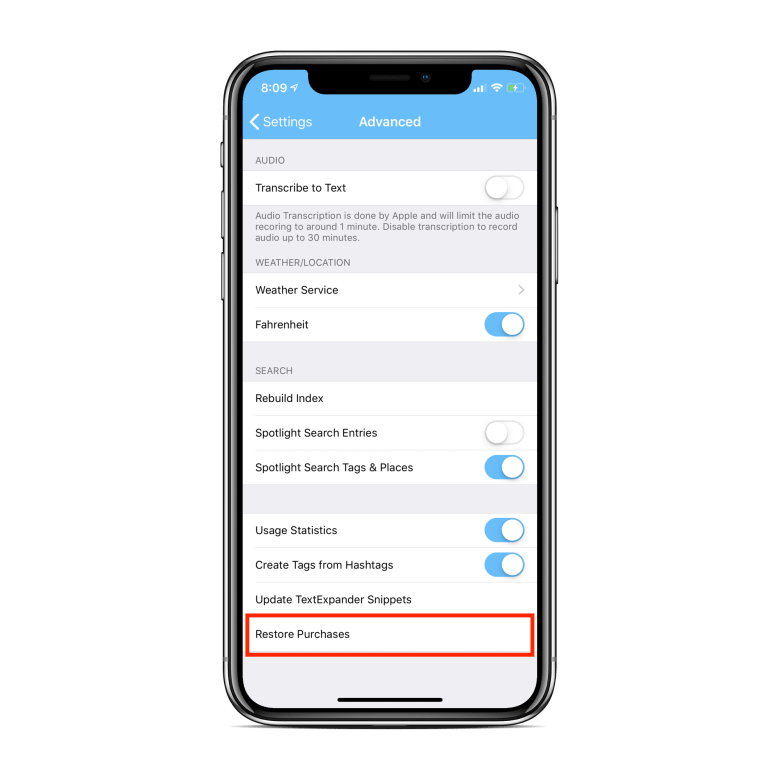
Android: Day One > Settings > Account Status > Select “Restore”

Mac: Go to Day One > Settings > Support > Restore Purchases

Or on the upgrade screen there is a button for Restore Purchases

If these steps do not resolve the issue, please contact a Happiness Engineer through our contact page for further assistance.
-
Hi there.
Sincere thanks for getting back to me.
I think part of the challenge is that I’m registered to premium with my gmail.com email address
But i’m assuming my Mac is registered to whatever the standard iCloud ID is (which is a free account).
I don’t seem to be able to log out or reset my Mac Application so I can then log in with the correct gmail.com account OR associate my iCloudID to my gmail.com account. -
Hi @taikohax,
We’d like to take a closer look at this by gathering account information.
As a Premium user, you have access to email support. Please reach out to us by going to Day One on iOS/Android > Settings > Support > Contact Support to start an email with the default mail client. Currently, only Apple’s default mail client is supported on iOS.
Please include the following if possible:
- Device info (Mac, iOS, Android)
- Day One version number on all devices
- Day One User ID
You can use the URL of this forum thread as a reference.
We’ll be on the lookout!


 Day One Forums