[Bug report] Font selection disappeared frequently
-
iPad Pro 11 inch Gen 4, iPad OS 17.5.1, Dayone 2024.14 (2519)
- “Setting” -> “Display” -> “Font” -> “Customize…” -> select “Songti TC”, which one of the default Chinese font in iPad.
- Somtimes, the interface text still stays in Helvetica. And there is a tick labeled also at Helvetica.
- Repeat this selection many times to get “Songti TC” ticked and displayed.
- Several days later, the selection at “Songti TC” will disappear again.
I suspect such error occurs not only to Chinese font, but also to all fonts which are not listed in the first page of font setting (meaning the fonts ONLY under “Customize…” page.
I have repeat such procedure over hundred times. Not only this version, nearly all version had this issue. May you look into it? Thank you!
-
I see why you’re having difficulty. The font of your entries will follow what is set in Day One, not what is set in Settings for your iPad. You can edit the fonts in Day One at Day One> Settings> Appearance> Font. This font change will only impact the way text shows in an entry when writing. It will not impact the rest of the interface in Day One.
If you still have trouble with fonts in Day One please, share a screenshot of your settings and what you’re seeing in the app so we can better assist.
-
Hi staff-mobilefox, thanks for your fast response. What I have done is exactly “Day One> Settings> Appearance> Font”, then encountered all those issues mentioned above. As I use Dayone Chinese version, I translate the setting names from Chinse to English and report as above. Maybe it is not precise and bring some confuse. Sorry.
I will provide screenshots to explain this issue when happening again. It takes some days. I am sure it will happen soon within 10 days. Please do not close this thread. Thank you!
-
Thank you so much. I look forward to your response! You can reply at any time when you’re ready, with no expiration date
-
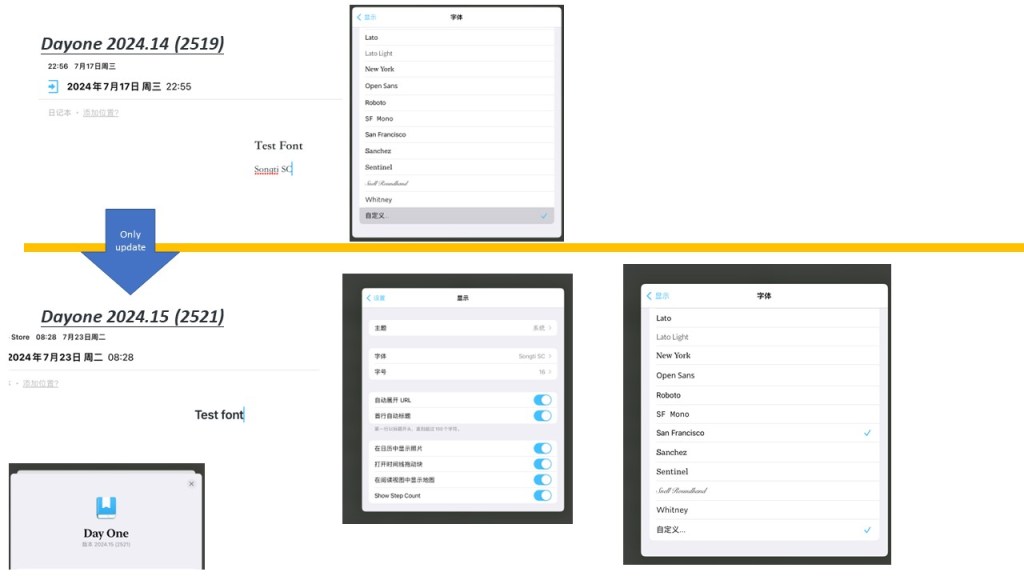
I have replicated this bug as pic below. The bug comes from the version update does not capture the user’s customized font selction and retain it. It seems the version update always choose the most closed font according to font name and take it.
Refer to the pic below. You can see I selected Songti SC in July 17th in Ver 2519. Only updating to Ver 2521, the ACTUAL font selection jumps to “San Francisco”, while the origainl font name row still retains “Songti SC”. You also can see in the font page, both “San Francisco” and “Customized…” as ticked.
Hope I have explained this bug. I believe your source code in everyone new version does not capture the user’s font selection and retain it. It seems you use some match algorithm and always come back to the font list in the first page in settings to get some font.
According to my past experience, I have to repeat many times of font selection to get back the right font. So, not only the updating has a bug in font selection, but also I suspect your source code section of selecting font has some issue. Hope you can take a look. Thank you!
-
Thanks for the detailed explanation, @jeffcheongsg! I’ve been able to replicate the issue, and I’ve now reported it to the developers.


 Day One Forums