Backup process : Do we have 2 copies of Dayone data in iCloud ?
-
I have gone through the guides about how the dayone backup works and how to backup the entries but still i have few doubts.
When i installed the app on my iPhone, i created the account and was logged in and i see the sync status is on.
However , the way data is being stored in my iCloud confuses me.
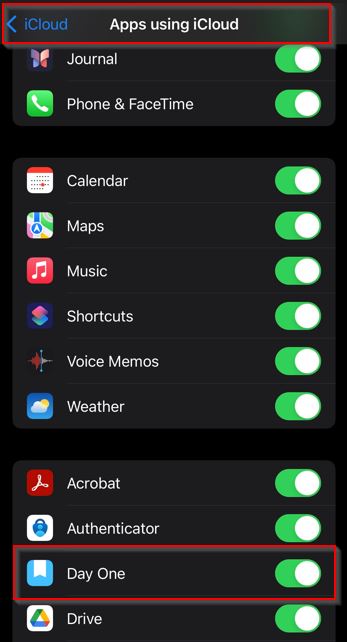
There is an option called “Apps using iCloud” in which dayone is enabled and stores in iCloud.
What happens if i turnoff Dayone in “Apps using iCloud” ?
Then there is another option which is device backup in which iCloud takes backup of all apps on the iPhone.
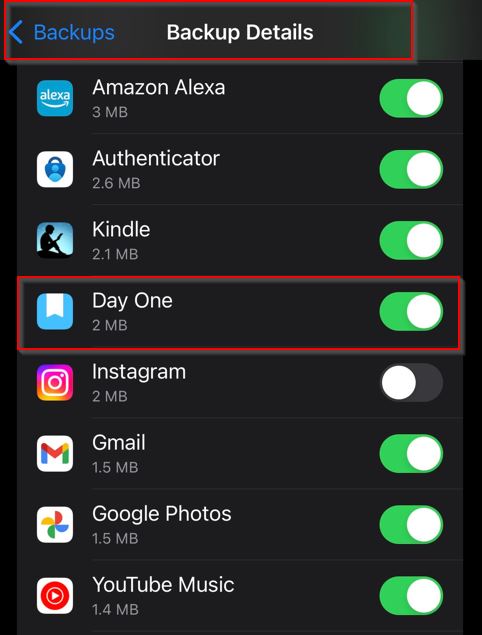
By looking, isn’t it storing the 2 copies of data on iCloud, because both the data are getting saved in iCloud.
Now, Could you confirm me if the my dayone data is getting stored twice on iCloud? If yes
Which method of backup should i select for dayone ?
a) Apps using iCloud
b) iCloud Device backup (backup of all apps)I have one more question
Can we import entries which are in other apps( in JSON format) to Dayone as mentioned in this guide
-
Thank you for your inquiry and for providing detailed information about your setup. I understand your concern about the potential duplication of data in iCloud. Let me clarify how Day One handles backups and syncing with iCloud. Syncing with Day One Sync
When you create an account and enable sync in Day One, your journal entries are stored securely on Day One Sync servers. This ensures that your data is up-to-date across all devices where you use Day One. iCloud Backup Options
There are two ways Day One data can be backed up to iCloud:
- Apps Using iCloud:
- This option allows Day One to store text-only backups in iCloud. These backups are enabled by default for Basic users and can be manually enabled by Plus and Premium users.
- If you turn off Day One in “Apps using iCloud,” the text-only backups will no longer be stored in iCloud. However, this will not affect the data stored on Day One Sync servers.
2. iCloud Device Backup:
- This is a comprehensive backup that includes all apps and their data on your device, including Day One. This backup is performed once per day and includes both text and photos from your Day One entries.
- Disabling this option will stop the device-wide backup, but it will not affect the Day One Sync functionality.
Is Data Stored Twice?
Yes, technically, if both options are enabled, your Day One data could be stored twice in iCloud:
- Once as part of the text-only backups in “Apps using iCloud.”
- Once as part of the comprehensive iCloud device backup.
Recommended Backup Method
Given that you are already using Day One Sync, which securely backs up your data to Day One’s servers, you have a few options:
- Keep Both Enabled: This provides an extra layer of redundancy, ensuring that your data is backed up in multiple places.
- Disable Text-Only Backups: If you prefer not to have duplicate backups, you can disable Day One in “Apps using iCloud” and rely on the comprehensive iCloud device backup along with Day One Sync.
Ultimately, the choice depends on your preference for redundancy and available iCloud storage space.
Can we import entries which are in other apps( in JSON format) to Day One as mentioned in this guide
The JSON import option is specific to our data model. JSON is a manual backup/export option we have. We do not currently support importing JSON from other apps except two on Android:
I hope this clarifies your doubts. If you have any further questions, feel free to ask!



 Day One Forums